
txt2spk – From Personal Workflow Problem to Privacy-First SaaS
It started because I was struggling to read long AI responses in my own terminal, so I built a private tool to read them aloud. txt2spk is that idea engineered into a separate public product: text, documents and web pages turned into speech, with documents processed on your device, accounts, Stripe subscriptions and a full test suite. Designed, built and run by me.
Jump to a section
- It started because I was struggling to read my own terminal
- From a private tool to a product
- How it works
- The best place to store someone's document was nowhere
- Letting someone paste a URL sounds simple. On a server, it isn't.
- From tool to SaaS
- Accessibility
- Production engineering
- What this project demonstrates
- Building software starts with noticing problems
- Technical stack
Built with
- Next.js
- React
- TypeScript
- Tailwind CSS
- Node.js
- MongoDB
- Mongoose
- Stripe
- Zod
- Nodemailer
- Vitest
- Playwright
- Nginx
At a glance
What it is
a reader that turns pasted text, documents and web pages into speech. Listen instead of read.
Where it came from
a private tool I built for my own workflow, later engineered into a separate public product.
Status
live at txt2spk.com, free to use, with a paid Pro plan. A Host Dada product.
It started because I was struggling to read my own terminal
I spend a lot of my working day with AI development tools such as Claude, running in the terminal. The answers are often long, detailed and heavily formatted, and reading screen after screen of small text in a dark terminal is tiring.
I didn't need another AI tool. The information was already there. I needed a better way to take it in.
So I built a small private app that read those responses aloud to me. I called it Claude Reader, and I used it every day.
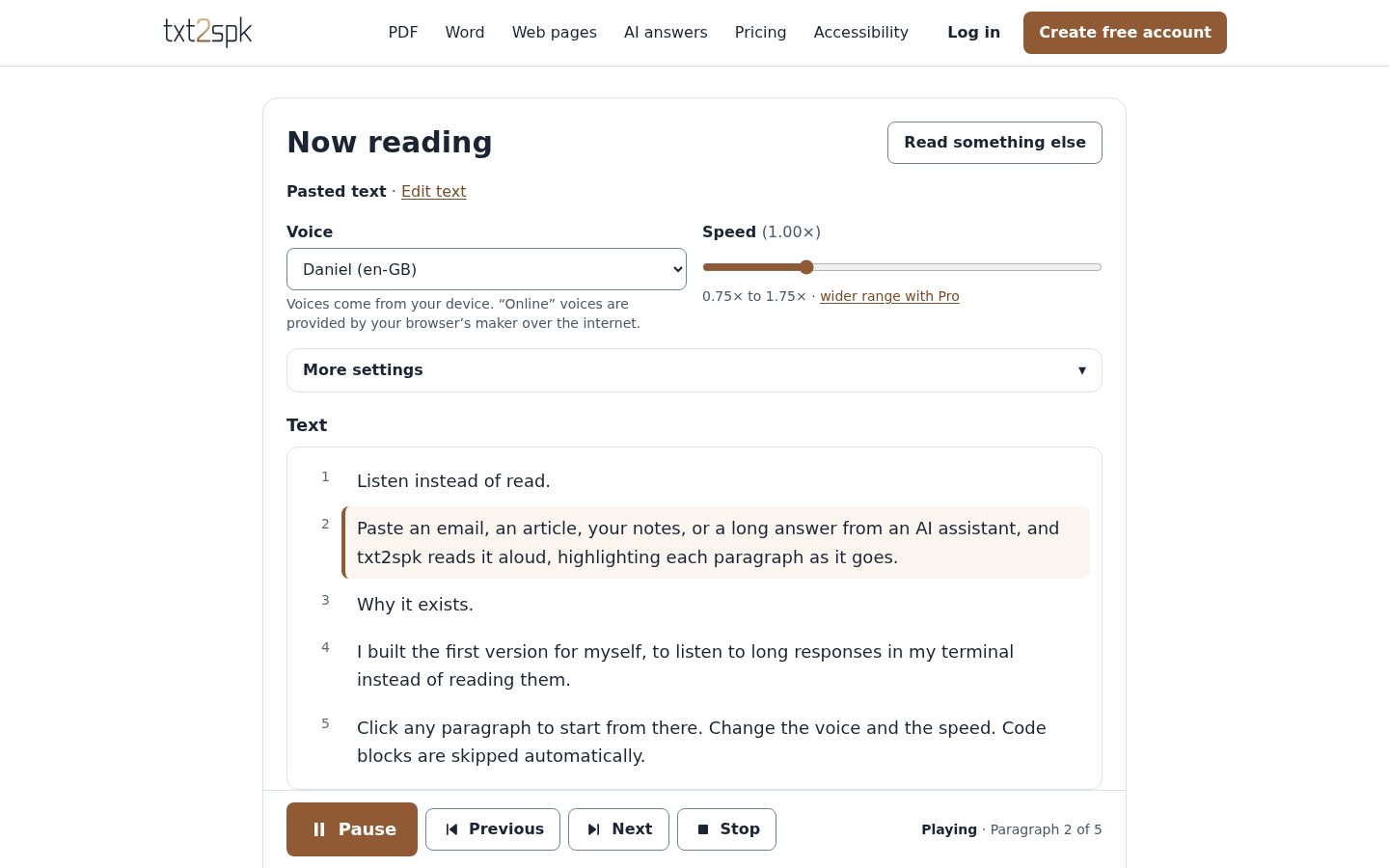
It stripped out the Markdown symbols, skipped code blocks, highlighted each paragraph as it was read and let me click any paragraph to start from there. Listening turned out to be better than reading for a lot of what I was working through.
From a private tool to a product
The same problem, everywhere
Once I was using it, the wider use was obvious. Long emails, reports, PDFs, Word documents, articles, Markdown notes and answers from ChatGPT, Claude or Gemini all have the same problem. Plenty of people would rather listen to them, whether they are tired of reading, working through something long, or simply doing something else at the same time.
Productised, not just made public
I didn't open up my private app. It still runs separately, just for me. Instead I took its reading engine — PDF and Word parsing, web-page extraction, the Markdown and AI clean-up, and the speech controls — into a new, separate application, built around the wider use case.
Before changing anything, I wrapped the original engine in automated tests. Writing those tests turned up three genuine bugs in the private app — including one that silently dropped a word after every colour code in terminal output — which were fixed in the new product before it launched.
How it works
There are three ways in, all on the home page and none of them behind a sign-up:
Paste text
an email, an article, notes or an AI answer. Free and unlimited.
Open a document
PDF, Word, text or Markdown — and, since it now recognises text, scanned PDFs and photos of pages.
Read a web page
paste a link and it finds the article, skipping menus and adverts.
Speech comes from the voices already on your device, so it costs nothing per word to run. Documents never start playing on their own: you see the text first, then press Play.
The best place to store someone's document was nowhere
A reading tool sees exactly the kind of material people want kept private: contracts, medical letters, work documents. The usual approach is to upload it, store it and then try to protect a growing pile of sensitive files. I designed it the other way round.
Pasted text
never leaves the browser. Clean-up and speech both happen on your device.
Documents
opened and converted inside the browser. There is no upload route for them at all, and the server only learns that a document of a certain type was opened, so free reads can be counted.
Scanned pages
text recognition also runs on your device, with the engine served from the site itself rather than a third party.
History and analytics
history keeps titles, file names and web addresses, never the text. Analytics only accept a fixed list of event names and values, so there is nowhere for content to go.
None of the database models has a field that could hold the text being read, and an automated test reads a document, pasted text and a web page, then searches every collection in the database to prove none of it was stored.
Privacy here isn't a policy promise added at the end. It's what the architecture makes possible.
Letting someone paste a URL sounds simple. On a server, it isn't.
Web pages are the one thing the browser can't fetch for itself, so the server fetches them. A feature that says "give me any address and I'll fetch it" can be aimed at the server's own private network rather than the public internet.
The fetcher only connects to public internet addresses. It checks every address a site resolves to, checks again at the moment of connecting, follows redirects one hop at a time so each new address is checked too, and limits size, time and content type. It returns the page untouched; the article is picked out in your browser.
Every one of those refusals has an automated test aimed at a real listening service, so a weakened guard fails the build rather than going unnoticed.
From tool to SaaS
Guest, Free and Pro
For the business: anyone can listen to pasted text without an account. Documents and web pages get a small free trial, a free account gives a monthly allowance, and Pro removes the limits and adds a listening queue, full history, a wider speed range and resuming where you left off on any device.
Under the hood: allowances are atomic counters in the database, so two requests at once can't both take the last free read, and a read that fails through no fault of the user — an unreachable site, an unreadable scan — is given back.
Commercial rules in one place
For the business: limits, prices, history sizes, fair-use ceilings, speed ranges and the grace period after a failed payment can all change without rebuilding the application, and every page that mentions a number updates with it.
Under the hood: one configuration file reads them from the environment, and the website copy uses placeholders that are filled with the live values.
Subscriptions
For the business: monthly or annual Pro through Stripe Checkout, with plan changes, cards, invoices and cancellation handled in Stripe's Customer Portal.
Under the hood: Pro is granted only by Stripe's signed webhook, each event processed once and in order. A browser arriving on a "thank you" page grants nothing.
Accounts and administration
For the business: registration, email confirmation, password reset, a list of signed-in devices, sign-out everywhere and self-service account deletion. An admin area lets me find any account, give complimentary Pro, reset allowances or suspend an account, plus first-party funnel analytics.
Under the hood: server-side sessions that can be revoked instantly, rate-limited sign-in, and a cross-site request check on every action that changes anything.
Accessibility
A tool that offers another way to take in written content has to take accessibility seriously, so it shaped both the product and how it was tested.
Keyboard
every control works without a mouse, and the transcript is a single tab stop you move through with the arrow keys.
Screen readers
loading, playing and errors are announced, but not every paragraph change, so it doesn't talk over the voice.
Comfort
four text sizes, a reduced-motion setting, and layouts that work at 200% zoom and on a phone.
Automated accessibility checks run on every page and every state of the reader as part of the test suite. Testing with real screen readers is the next step, and the accessibility statement says so rather than claiming more than has been checked.
Production engineering
It's tested and deployed like a product that takes payments, because it is one. More than 200 automated tests cover the reading engine, the URL guard, the billing rules, accessibility, keyboard use, account journeys, usage limits and the privacy guarantee.
Each release is built separately from the live site, swapped in only when complete, health-checked, and rolled back automatically if it doesn't come up.
What this project demonstrates
Noticing a problem
it began with friction in my own working day, not a brief.
Productisation
a private tool proved the idea; a separate product was engineered around the wider use.
Privacy by design
the safest way to handle people's documents was not to collect them.
The full stack
idea, software, database, billing, security, server and deployment, all built and run by me.
Building software starts with noticing problems
txt2spk wasn't commissioned. Something in my own workflow wasn't working well, so I built something to fix it, used it every day, realised the problem was bigger than me, and turned the solution into a product anyone can use.
Understanding the problem before deciding what to build is the same thinking I bring to client work.
Technical stack
Next.js 16 and React 19 in TypeScript, MongoDB with Mongoose, Stripe Checkout, Customer Portal and webhooks, the browser's own speech engine, PDF.js, Mammoth and Tesseract running in the browser, Zod validation, Tailwind CSS, Nodemailer, Vitest and Playwright with automated accessibility checks, running as a Node.js service behind nginx on my own infrastructure.
Gallery
Project Links
Let's Work Together
Ready to Build Something Remarkable?
Whether you need a bespoke website, a full digital marketing strategy or a technical partner who understands business, I'm here.